Data Retention & GDPR
Data retention is the set of rules governing how long RapiDesq keeps your conversation and ticket data before automatic deletion. Retention intersects directly with GDPR, CCPA, and similar regulations — so RapiDesq pairs configurable retention with legal holds, data subject request tooling, and self-service data export. This guide covers the Message Policies page (retention, edit windows, and delete permissions), legal holds, privacy requests, data export, and how multi-region data residency fits into compliance.
Message Policies
Retention is configured on the Message Policies page (Admin > Message Policies), together with two related conversation governance policies: the message edit window and message deletion permissions. The page shows your current setting for each policy and your plan tier's limits.
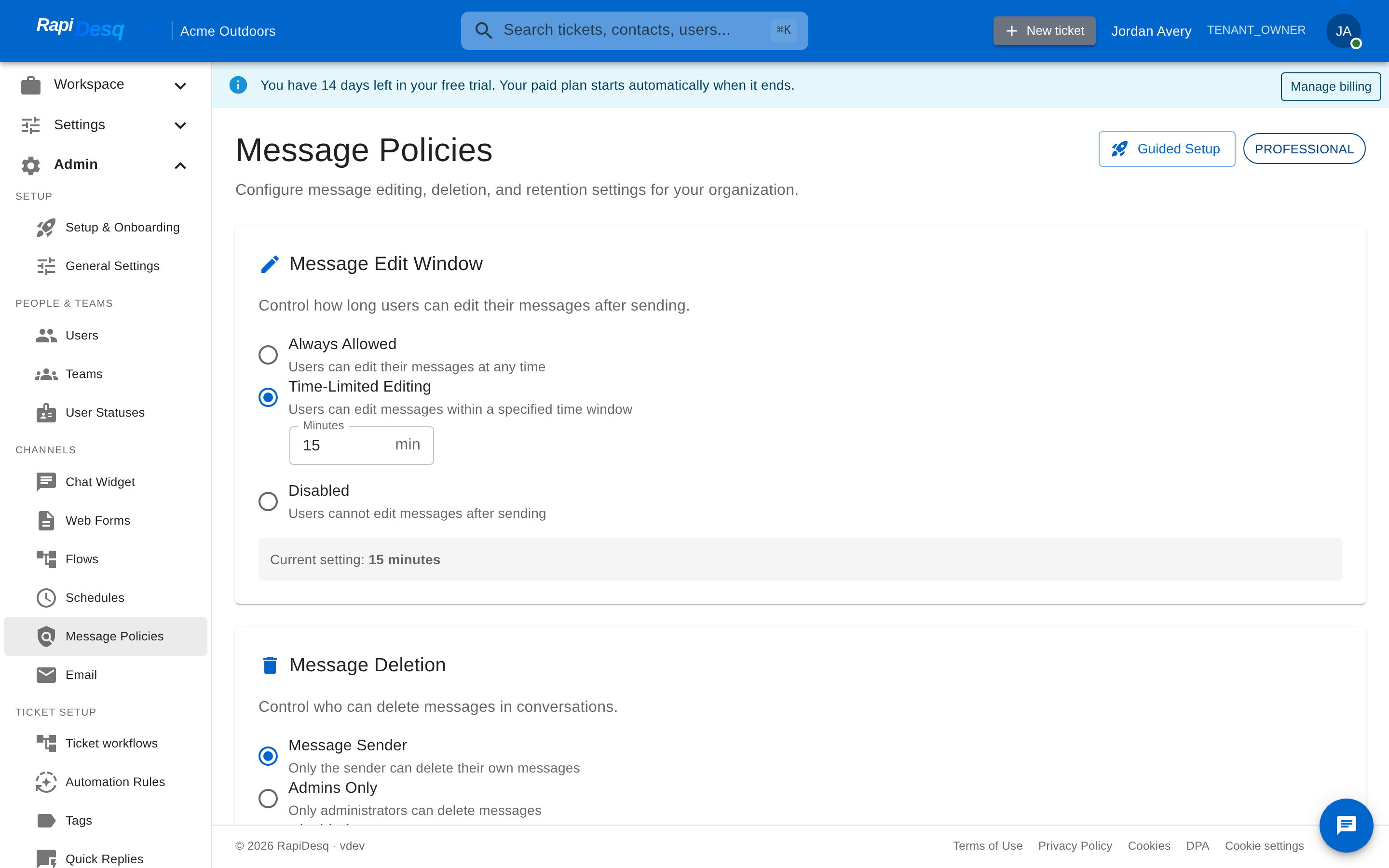 Message Policies: edit window, deletion permissions, and retention periods configured in one place.
Message Edit Window
Controls how long users can edit their messages after sending. Choose one of:
- Always Allowed — users can edit their messages at any time.
- Time-Limited Editing — users can edit messages within a specified time window, set in minutes.
- Disabled — users cannot edit messages after sending.
Message Deletion
Controls who can delete messages in conversations. Choose one of:
- Message Sender — only the sender can delete their own messages.
- Admins Only — only administrators can delete messages.
- Disabled — message deletion is disabled for all users.
Customizing message deletion settings requires the Professional tier or higher; on lower tiers the section is shown but locked.
Data Retention
Configure how long messages and tickets are retained before automatic deletion:
- Message Retention — how many days messages are kept.
- Ticket Retention — how many days tickets are kept.
Each plan tier has a maximum retention period; the page shows the maximum for your tier next to each field.
You can also enable Notify before data deletion, which sends an email notification to admins 7 days before scheduled data deletion — useful as a final checkpoint before retention-driven deletion runs.
Legal Holds
A legal hold suspends deletion for specific data that would otherwise be eligible under your retention policy. Holds are used during litigation, regulatory investigation, or internal inquiry when deletion would be legally problematic. Legal holds are managed at Admin > Legal Holds and are an Enterprise feature.
Creating a hold
Each hold records a name, an optional external reference (such as a case number), and a description. A hold's scope is one of:
- Date Range — preserves data created between a start and end date.
- Specific Users — preserves data associated with the selected users.
Before you create the hold, you can preview the affected record count — the page shows approximately how many items the hold will preserve, so you can confirm the scope captures what you intend.
Creating a hold requires an attestation: you enter your name and title and acknowledge that the hold creates a legal obligation to preserve the specified data and that you have the authority to place it on behalf of your organization.
Reviewing and releasing holds
The holds list shows each hold's scope, the number of messages and conversations it preserves, its status (Active, Released, or Expired), and its next review date. Holds require periodic review:
- Holds past their review date are flagged as Overdue, and the page shows a warning with the count of holds requiring review.
- Holds not reviewed within 14 days of their review date automatically expire.
- Reviewing a hold extends it by 90 days.
Releasing a hold requires a release reason and allows the preserved data to become subject to normal retention policies again — the release cannot be undone. Each hold keeps its own audit trail of creation, review, release, and expiry events.
Privacy Requests (GDPR Data Subject Rights)
GDPR and similar frameworks give data subjects specific rights over their data. RapiDesq manages these as Privacy Requests (Admin > Privacy Requests), an Enterprise feature. Three request types are supported:
- Access Request (Article 15) — the data subject requests a copy of the data held about them.
- Data Portability (Article 20) — the data subject requests their data in a structured, machine-readable format they can take elsewhere.
- Erasure (Right to be Forgotten) (Article 17) — the data subject requests deletion of their personal data.
Request lifecycle and deadline tracking
Each request moves through statuses: Pending Verification, Verified, Processing, Blocked by Legal Hold, Completed, Rejected, or Expired. Every request has a deadline, and the page tracks it for you — showing days remaining, "due today", or how many days a pending request is overdue. Dashboard counters summarize pending, overdue, blocked, and completed requests, with tabs to filter the list.
Processing an erasure request permanently deletes the data subject's personal data — the confirmation dialog makes clear this cannot be undone. Completed requests record when they were processed and how many items were affected. Requests can also be rejected with a reason, and the data subject is notified.
Interaction with legal holds
If the data covered by a request is under an active legal hold, the request is marked Blocked by Legal Hold and shows the blocking reason. The erasure is deferred until the hold is released, preserving your legal obligations while keeping the request visible and tracked.
Rectification
Requests to correct inaccurate personal data (Article 16) are handled directly: contact records — name, email, phone, and custom fields — can be edited from the contact detail view (see Contact Management).
Data Export
Beyond individual data subject requests, you can export data for compliance, backup, or migration at Admin > Data Export.
An export is defined by:
- Date range — a start date and end date.
- What to include — checkboxes for Conversations & Messages, Tickets, and Contacts.
- Advanced options (Enterprise tier only) — Include deleted content and Include edit history.
Exports are generated asynchronously: the job appears in the Recent Exports list with a status of Pending, Processing, Completed, Failed, or Expired, and when complete you download a compressed JSON archive. Download links don't last forever — old exports eventually show as Expired.
Export usage is subject to quotas. The page shows a quota banner with how many exports you've used this month and how many remain, plus your concurrent-export usage; at most 2 exports can be running at once.
Multi-Region Data Residency
Data residency compliance overlaps with retention but addresses a different question: not "how long?" but "where?" RapiDesq's multi-region architecture keeps your data in your tenant's home region — conversations, tickets, contacts, and attachments remain in that region for their entire lifetime, supporting requirements around cross-border data transfer.
Best Practices
- Configure retention before launching. Retention rules are easier to tighten than to loosen once data has accumulated under a permissive setting.
- Align retention with regulatory requirements. Regulated industries often have specific minimum retention periods that must be respected; set your message and ticket retention accordingly within your tier's limits.
- Enable deletion notifications. The 7-day advance email gives you a final window to place a legal hold or run an export before retention-driven deletion runs.
- Use the hold preview before creating. The approximate item count tells you whether your scope actually captures the data you need to preserve — check it before attesting.
- Stay ahead of hold reviews. Holds not reviewed within 14 days of their review date expire automatically. Watch the overdue counter and use Review & Extend before that happens.
- Test data export before you need it. When a real GDPR request arrives is not the time to discover gaps in your export workflow. Run a test export periodically, and keep the export quota in mind.
- Watch privacy request deadlines. The overdue tab and deadline countdowns exist so requests don't silently slip past their regulatory timeframe.
Related Topics
- Audit Logs — the record of retention policy changes, legal hold activity, and privacy request fulfillment.
- Contact Management — where contact rectification is performed.
- File Attachments — how file data is stored and handled.