AI Credits & Billing
RapiDesq meters AI usage in credits — a single unit you can see, budget for, and control. Every plan includes a monthly credit allotment; you can top up when you need more, and auto-refill keeps things moving with a monthly cap you set. Crucially, unused credits from your subscription allotment roll over for one month, so a quiet month earns you a buffer instead of being lost. This guide covers everything about how credits work: what they're consumed for, how rollover works, how to purchase more, how auto-refill is configured, what happens when you run out, and how to monitor usage.
Overview
RapiDesq uses a credit-based AI billing model instead of the per-resolution, per-seat, or per-token models common among other contact center platforms. The design goals:
- Predictable. You know what a month will cost before it starts. No surprise invoices when traffic spikes.
- Transparent. AI consumption is visible on the Usage tab, broken down by feature and by the contacts driving it.
- Customer-favorable on rollover. A quiet month shouldn't punish you. Unused subscription credits roll over one month.
- Under your control. Auto-refill has a monthly cap you set. You cannot be surprised into spending more than you authorized.
- One meter for everything AI. Bot conversations, analysis features, ticket description generation, and knowledge base indexing all draw from the same credit pool — no juggling separate budgets.
Most AI-enabled contact center platforms (Intercom Fin, Zendesk AI, Gorgias AI, Freshdesk Freddy) bill either per-resolution with strict monthly resets or per-seat with no carry-over. Unused capacity in a quiet month is simply forfeited. RapiDesq lets unused subscription credits roll over one month so a slower period builds up a buffer for the next one. Details below.
What Uses Credits
Any AI-driven operation in the platform consumes credits from the same pool:
| Operation | Description |
|---|---|
| Customer chatbot conversations | Every turn in a customer-facing bot conversation. The bot reads the conversation context, searches the knowledge base, and generates a response. Cost scales with conversation length and complexity. |
| Agent-assist bot | Conversational bot actions users run from inside the workspace, grounded in the ticket or conversation they're working. |
| Analysis features | Ticket analysis, suggested replies, smart triage, summarization, action items, sentiment analysis, and auto-categorization, run as tickets and conversations progress. |
| Ticket description generation | The Generate Ticket Description node in conversation flows, which produces an AI-authored summary of the conversation before an agent picks up the ticket. |
| Knowledge base indexing | Processing documents you add to a knowledge base — uploads, crawled pages, and data source syncs — so the AI can search them. |
Everything AI-driven uses credits, and the cost of an operation also depends on the model tier of the agent that runs it — Standard-tier operations cost less than Advanced-tier ones. Non-AI operations — agents handling tickets, conversation flows running without AI nodes, routing decisions, reporting — do not consume credits.
Plan Allotment
Every paid plan includes a monthly credit allotment. The allotment is tied to your billing cycle — on the first day of each cycle, your account receives the full allotment for that month. The specific allotment depends on your plan (details in your plan's pricing page once pricing is published).
Your plan allotment is the baseline. Most customers never need to think about more than the allotment — AI usage in a typical month fits within it, and rollover absorbs the variance. Top-up purchases and auto-refill are there for customers with higher usage or unusual spikes.
One-Month Credit Rollover
Unused credits from your plan allotment carry over into the next month, once. This is the most unusual part of the RapiDesq credit model and worth understanding in detail.
How it works
- On day 1 of each billing cycle, your account receives your plan's credit allotment.
- Throughout the cycle, you consume credits as AI operations happen. Credits are consumed oldest-first — any rolled-over credits from last month are spent before this month's allotment is touched.
- At the end of the cycle, any credits remaining from this month's allotment roll over into the next cycle and are available during that cycle.
- Rolled-over credits expire at the end of the following cycle if they weren't used — one month carry-forward, not indefinite accumulation.
Example
Imagine a plan with 10,000 included credits per month.
| Month | Allotment received | Credits consumed | Rolled into next month | Notes |
|---|---|---|---|---|
| January | 10,000 | 7,000 | 3,000 | Quiet month; 3,000 of this month's allotment unused. |
| February | 10,000 + 3,000 rolled over = 13,000 usable | 12,000 | 1,000 (from February's allotment, since rolled-over credits were spent first) | Busy month; the rollover from January absorbed the spike. No top-ups needed. |
| March | 10,000 + 1,000 rolled over = 11,000 usable | 6,000 | 4,000 (plus the February carryover is now forfeited if unused) | Quiet month again; February's carryover is gone, but March's own unused credits roll into April. |
The net effect: you get a one-month buffer against usage variance. Months where you use less than your allotment earn you a reserve that absorbs spikes in the following month. A quiet December doesn't forfeit your unused budget; it prepares you for a busy January.
What does and doesn't roll over
- Subscription allotment credits: roll over one month.
- Top-up purchase credits: do not expire at the end of a cycle. Purchased credits stay in your account until used (subject to a longer expiration window, typically 12 months, shown on the Credits tab).
- Trial credits: expire at the end of your trial. They do not roll over into your paid plan.
- Promotional or bonus credits (from referrals, launch bonuses, etc.): individual expiration dates apply per promotion, shown on the Credits tab.
For most customers, rollover means you never need to think about credit budgeting month-to-month. Variance that would force others to over-provision or pay surprise overages just gets absorbed by the buffer. Usage averages out over 2–3 month windows rather than requiring you to match the spikiest month every month.
Top-Up Purchases
When your plan allotment plus rollover isn't enough for a month's usage, you can purchase additional credits at any time.
How it works
- Navigate to Admin > AI Settings > Credits and select Buy Credits.
- Choose a credit pack size — packs are offered in several sizes, with larger packs at a slightly lower per-credit rate.
- Complete the purchase using the payment method on file. Purchased credits are available immediately — there's no delay.
Top-up credit lifetime
Top-up credits don't expire at the end of your billing cycle. They stay in your account until used, with a long expiration window (typically 12 months from purchase). This means an occasional large top-up can cover several months of overages without penalty.
Consumption order
When you use credits, the system consumes them in this order:
- Trial credits (if any, until they expire)
- Promotional credits that expire soonest (to avoid waste)
- Rolled-over subscription credits from the previous month (to avoid waste when the current month ends)
- This month's subscription allotment
- Top-up credits (longest expiration window, safest to consume last)
This order means the credits closest to expiring are always spent first. You never lose a credit to expiration when another credit would have expired sooner.
Auto-Refill
Auto-refill automates top-up purchases so you don't have to intervene every time credits run low. Configuration is in the Auto-Refill section of Admin > AI Settings > Credits, with a live preview of what your settings will cost before you save.
How it works
You configure four things:
- Enable / disable. Auto-refill is off by default. You turn it on explicitly.
- Threshold. The credit balance at which auto-refill triggers. For example, "when my balance drops below 500 credits, buy more."
- Refill amount. How many credits to purchase when the threshold is hit. Usually one of the standard top-up pack sizes.
- Monthly cap. The most auto-refill will spend in a single billing cycle. Once the cap is hit, auto-refill stops until the next cycle, even if the balance drops below the threshold again.
Partial purchases near the monthly cap
If a refill would exceed the monthly cap, auto-refill purchases whatever portion of the refill amount fits within the cap, rather than either blowing through the cap or skipping the refill entirely. For example, if your cap has $50 remaining and the standard refill is $100, auto-refill purchases $50 worth of credits.
Notifications
Auto-refill triggers send notifications to billing admins:
- Every successful auto-refill (so you have visibility; there's never a silent purchase)
- When approaching the monthly cap (typically at 80% and 95%)
- When the cap is reached and auto-refill stops
- If auto-refill fails (payment method declined, card expired, etc.)
Auto-refill will not spend more than the cap in a single billing cycle. If usage exceeds what the cap can cover, the account enters the depletion behavior described below rather than silently purchasing more. This is deliberate — a misconfigured bot or a traffic spike should never result in a surprise bill larger than you authorized. Removing the cap entirely is possible but requires an explicit typed confirmation, so unlimited spending can never be enabled by accident.
Depletion Behavior
If you run out of credits with auto-refill disabled (or with the monthly cap hit), AI operations enter a graceful depletion mode. This keeps the platform running for non-AI features while preventing surprise charges.
Sequence of events
- Balance warnings. Billing admins receive notifications as the balance approaches zero (typically at 25%, 10%, and 5% remaining).
- At zero credits. New AI operations are deferred. Bot conversations gracefully hand off to humans with a context note; AI analysis runs on tickets only if credits are available; ticket description generation and other in-flow AI features are skipped.
- Non-AI features continue normally. Agents handle tickets, flows run their non-AI nodes, routing works, reporting works. Only AI-specific features are affected.
- Customer-facing experience. If a bot was about to respond when depletion hits, the conversation smoothly transitions to the team that the bot would have escalated to. Customers don't see an error; they see a handoff message.
- Replenishment. At the start of your next billing cycle, the plan allotment is replenished and AI operations resume automatically. If you've purchased top-ups in the interim, those are applied immediately as soon as the purchase completes.
User and admin visibility
The Credits tab shows clear warnings when the balance is low or depleted, and billing admins are notified. There's no silent degradation — your team knows when AI features are paused.
Monitoring Usage
Two tabs under Admin > AI Settings cover monitoring: Usage shows where AI activity is going, and Credits shows your balance and refill configuration.
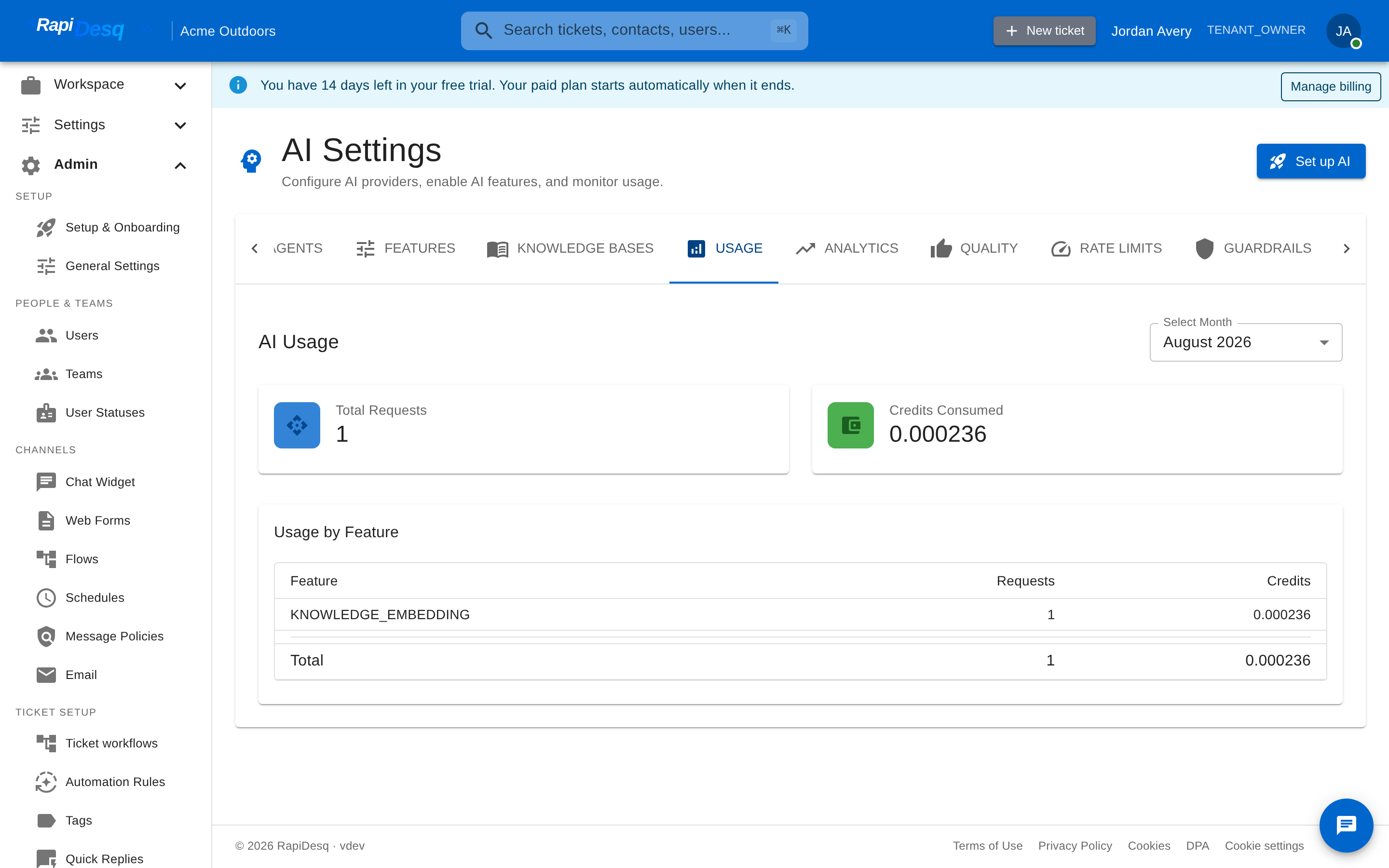 The Usage tab: monthly AI requests and credits consumed, broken down by feature.
What the Usage tab shows
| Panel | What it shows |
|---|---|
| Monthly totals | Total AI requests and total credits consumed for the selected month. |
| Usage by feature | Consumption broken down by feature — chatbot conversations, suggested replies, summarization, and so on. This is where you see where spend is going and whether any feature is behaving anomalously. |
| Top contacts | The contacts driving the most AI usage, so a spike can be traced to specific conversations rather than guessed at. |
What the Credits tab shows
The Credits tab shows your current credit balance, this period's consumption, quick purchase options, and your auto-refill configuration — threshold, refill amount, and how the monthly cap is set. Low-balance and depleted states are flagged prominently here as well as via notifications.
Practical Guidance
Most customers don't need to think about it
For typical usage patterns, the plan allotment plus rollover absorbs month-to-month variance. You don't need to set up auto-refill, you don't need to watch the Usage tab closely, and you don't need to purchase top-ups. Check it monthly as part of a regular billing review and that's usually enough.
High-volume customers
If your AI usage consistently exceeds your plan allotment (even accounting for rollover), auto-refill is the right configuration. Set the monthly cap to a number you're comfortable with and let it run. The cap ensures you can't be surprised, and the automation means you don't get interrupted by depleting balances.
If your usage is consistently far above the plan allotment, consider moving to a higher-tier plan. The per-credit rate in higher tiers is typically lower, so if you're going to use a lot of credits regardless, the included allotment in a higher plan is usually cheaper than repeated top-ups.
Spiky usage
If your usage varies a lot month-to-month — for example, a seasonal business or a product with event-driven traffic — rollover works in your favor. A light month builds a reserve that absorbs the next busy month. You may not need auto-refill at all if the pattern stays within the rollover buffer.
When to monitor closely
- In the first 1–2 months after launching a new bot or rolling out AI to a new channel, to understand what its baseline usage looks like
- During any significant product change, marketing campaign, or traffic spike
- When auto-refill approaches the monthly cap, to decide whether to raise the cap
- When the usage-by-feature breakdown shows something unexpected — a sudden jump in chatbot usage might indicate a traffic spike or a bot stuck on out-of-scope questions, for example
Frequently Asked Questions
Why credits instead of per-resolution pricing?
Per-resolution pricing (charging for each customer question the bot answers) aligns incentives to make the bot resolve things, but it's also highly unpredictable — traffic spikes produce invoice spikes. Credits are a stable unit that can be budgeted in advance. The platform's incentive to make bots resolve well is still there (customers stay if bots work), just without imposing unpredictable costs on you.
What happens if I use more credits than my plan allotment and rollover allow?
If auto-refill is enabled, additional credits are purchased up to the monthly cap. If auto-refill is disabled or the cap is reached, AI operations gracefully pause (bots hand off to humans, AI analysis is skipped) until the next billing cycle or a manual top-up purchase.
What happens if I forget to enable auto-refill?
Nothing catastrophic. You'll receive balance warnings as you approach zero. If you do run out, AI features pause but the rest of the platform keeps working. You can purchase a top-up at any time and credits are available immediately.
Can I change the auto-refill cap mid-cycle?
Yes, at any time. The new cap applies from that moment onward in the current cycle. Past auto-refill purchases count against the new cap (so raising the cap mid-cycle effectively gives you headroom for the rest of the cycle).
What about trial credits?
New accounts start with a trial credit allotment to let you evaluate AI features before committing. Trial credits have their own expiration (typically at the end of the trial period) and don't roll over into paid plans.
How much does one AI operation cost in credits?
It depends on the operation's complexity and the model tier of the agent that runs it — a Standard-tier agent costs less per operation than an Advanced-tier one, and a short bot exchange costs less than a long multi-turn conversation with knowledge base searches. The Usage tab shows what each feature actually consumed, and the Credits tab shows a live preview of refill costs while you configure auto-refill.
Can unused credits roll over more than one month?
No. The rollover is one cycle only. This is a deliberate design choice: the point of rollover is to absorb month-to-month variance, not to allow accumulation. If you consistently use far less than your allotment, you should consider a smaller plan.
Related Topics
- AI Bot Configuration — how to set up the bots that consume credits during customer conversations.
- Knowledge Base — what content the bot searches; directly affects how efficiently credits are used.
- Conversation Flows — how the AI flow nodes (Bot Conversation and Generate Ticket Description) consume credits.