Knowledge Base
Knowledge bases hold the content your AI answers from — help articles, policies, product guides, and FAQs. This guide covers creating knowledge bases, adding documents from files, text, URLs, site crawls, and FAQ imports, keeping content synced automatically with data sources, monitoring indexing health, scoping knowledge bases to specific AI agents, and verifying retrieval with the built-in test search.
Overview
A knowledge base is a named collection of documents. When a customer asks your chatbot a question — or an agent requests a suggested reply — the AI searches the knowledge bases connected to that agent and grounds its answer in what it finds. The AI can only answer from content you've given it, which is exactly what makes its answers trustworthy.
You can run multiple knowledge bases and connect each AI agent to a different subset. A billing bot connected only to a billing knowledge base searches only billing content; a general support bot might use all of them. This scoping is what lets you run focused, high-quality bots instead of one mega-bot searching an undifferentiated content blob.
Knowledge bases are managed under Admin > AI Settings > Knowledge Bases.
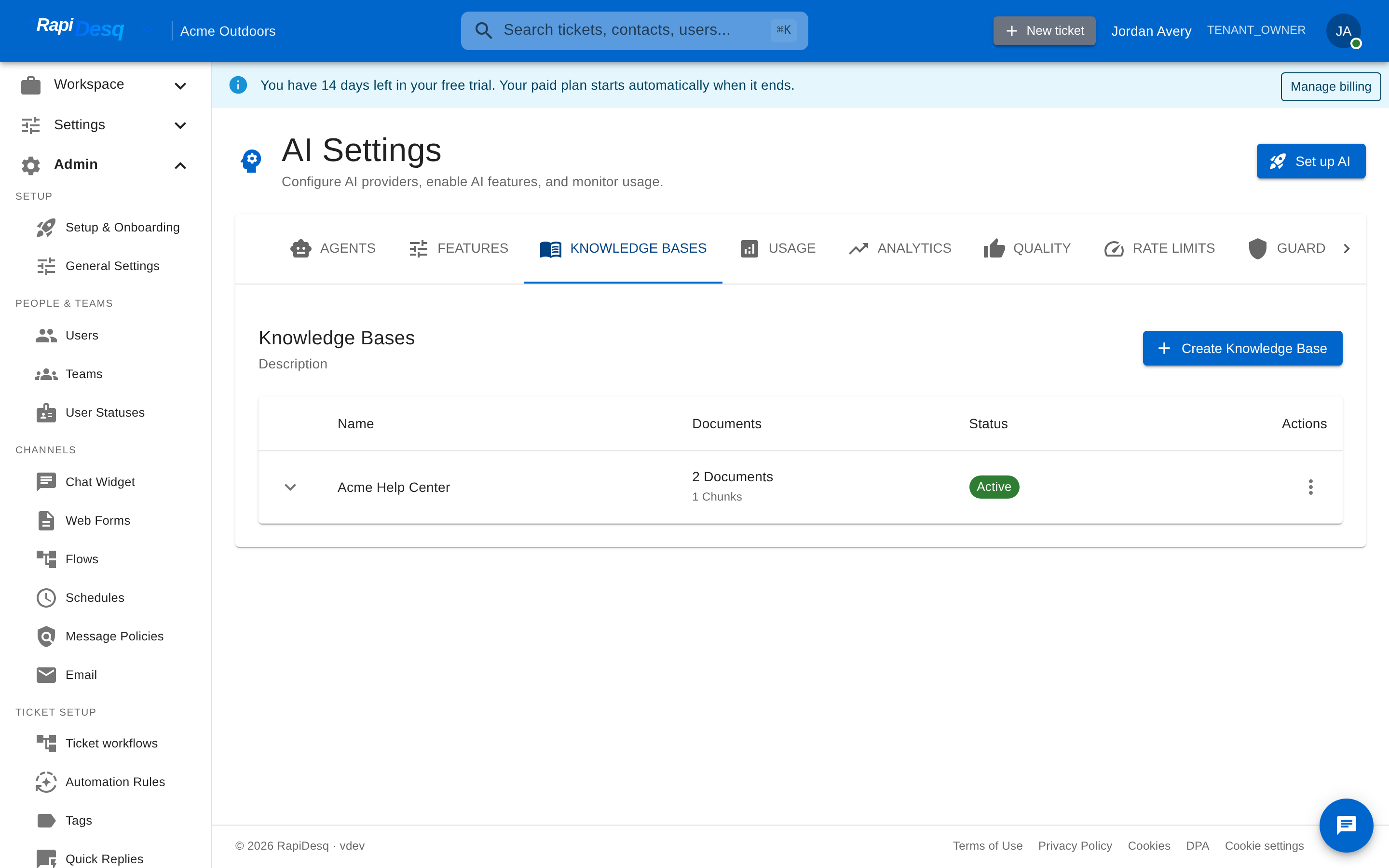 The Knowledge Bases tab: each knowledge base shows its document count, indexed chunks, and status.
Creating a Knowledge Base
Click Create Knowledge Base to open a three-step wizard: Basic Info, Add Documents, and Review. You can add documents during creation or any time afterward.
| Field | Description |
|---|---|
| Name | A name for the knowledge base (e.g., "Billing & Payments", "Help Center"). Shown in admin views and in each agent's knowledge settings. |
| Description | A short description of what's inside. Useful when choosing which knowledge bases to connect to an agent. |
| Document processing | How documents are split for retrieval — target, maximum, and overlap sizes. The defaults work well for almost everyone; they're set at creation time. |
| Active | Whether the knowledge base is available to AI agents. Deactivate it to take its content out of circulation without deleting anything. |
Too many tiny knowledge bases become a management burden and make agent scoping fiddly. Aim for a handful, each covering a meaningful topic area — "Billing", "Product", "Getting Started" — rather than one per document.
You can also create your first knowledge base inline from the Set up AI wizard: give it a name and a first source — a web page URL or pasted text — and the wizard creates it and connects your AI to it in one pass.
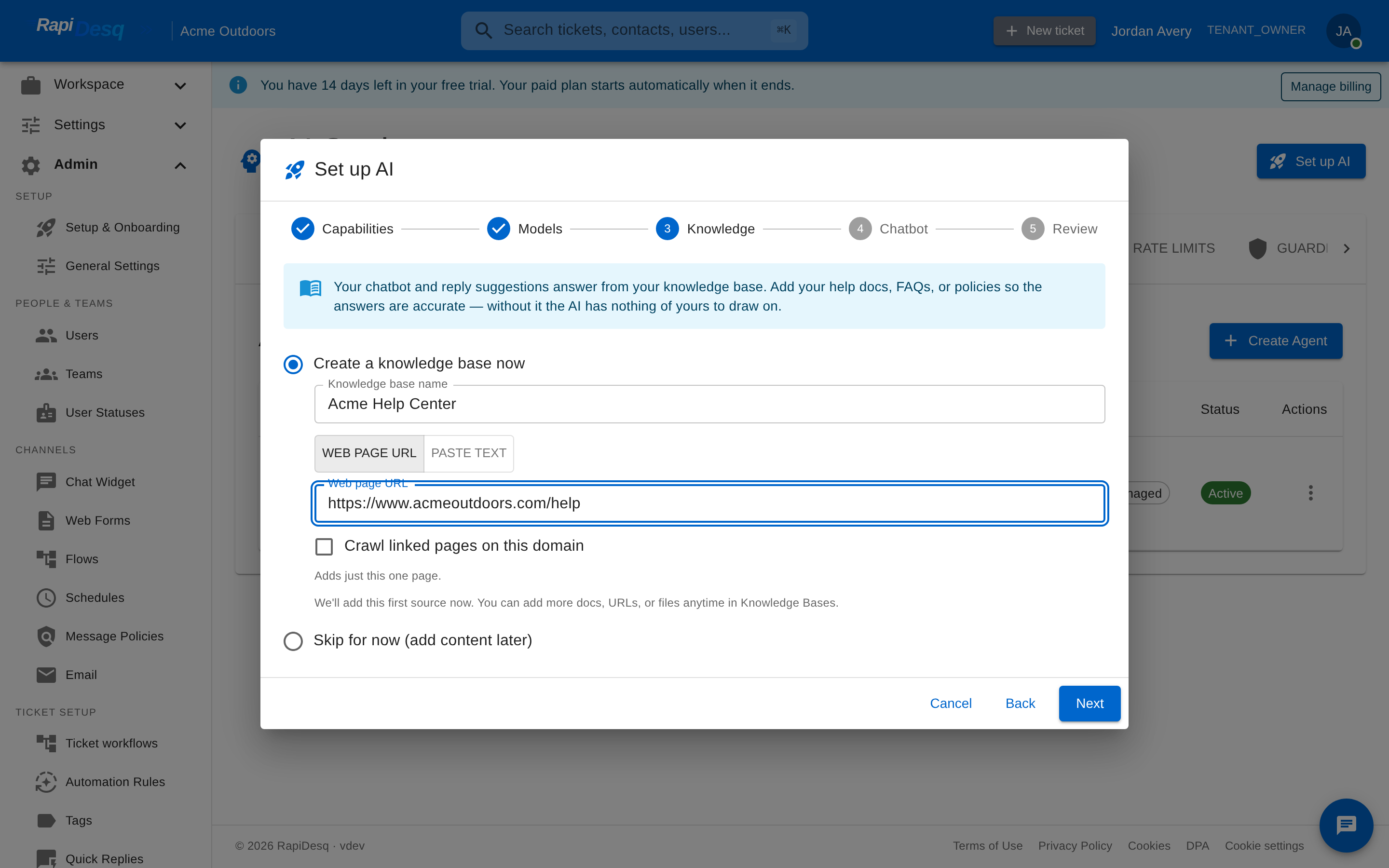 The Set up AI wizard can create a knowledge base inline from a name and a first source URL.
Adding Documents
Expand a knowledge base and click Add Document. Documents come from five source types:
| Source type | What it does |
|---|---|
| File Upload | Upload an existing document. Supported formats: PDF, Word (.docx/.doc), plain text (.txt), Markdown (.md), and HTML. |
| Plain Text | Paste content directly — an FAQ answer, a policy excerpt, anything the AI should know that doesn't live in a file. |
| URL | Fetch a single web page. With the crawl toggle off, just that one page is added. |
| Web Crawl | Start from a URL and follow links within the same domain. External sites are never followed. |
| FAQ | Question-and-answer pairs imported as structured FAQ content. |
Single page vs. crawling a site
When you add a URL, a toggle — "Crawl linked pages on this domain" — controls the scope:
- Toggle off: adds just that one page.
- Toggle on: from that page, follows links within the same domain only — up to 25 pages, 2 levels deep. External sites are never followed.
For larger crawls with your own page and depth limits, use a data source instead; the Set up AI wizard's inline crawl also exposes max pages and max depth directly.
Indexing status
Every document shows its processing status:
- Pending — queued for processing.
- Processing — being parsed and indexed.
- Indexed — searchable by your AI. The document's chunk count shows how much retrievable content it produced.
- Failed — something went wrong; the error message is shown on the row so you can fix the source and retry.
A knowledge base that contains documents but has indexed none of them shows a "Needs attention" warning next to its status. "Active" means the knowledge base is enabled — it doesn't by itself mean the content is searchable. Expand the knowledge base to see which documents failed and why.
Automatic Data Sources
For content that changes over time, add a data source instead of one-off documents. Data sources ingest content automatically and can be re-synced on demand:
| Type | Configuration |
|---|---|
| Web crawl | A start URL plus max depth and max pages limits. Crawls stay within the start URL's domain. |
| Sitemap | A sitemap URL — ingests the pages the sitemap lists. |
| RSS feed | A feed URL — ingests new entries as they're published. |
| FAQ import | Question-and-answer pairs, one per line, formatted as question :: answer. |
Each data source shows a sync status (Pending, Syncing, Completed, Failed, or Paused) and offers Sync now and Pause actions. Documents produced by a data source appear in the knowledge base's document list like any other document.
Crawling sites behind a WAF or Cloudflare
When RapiDesq crawls a page it identifies itself with a stable User-Agent:
RapiDesqKBCrawler/1.0 (+https://rapidesq.com/crawler)Sites protected by a firewall or CDN — Cloudflare, Akamai, AWS WAF and similar — may answer the crawler with a bot challenge (an interstitial or CAPTCHA) instead of your content. When that happens the data source fails with a message like "The site served a bot challenge instead of content. Add this data source's crawl token to your site's WAF allowlist." To let the crawler through, allow-list it with the crawl token.
The crawl token
Every Web Crawl data source has a unique, automatically generated crawl token that looks like rdq_crawl_…. RapiDesq sends it on every crawl and render request as an HTTP header:
X-RapiDesq-Crawl-Token: rdq_crawl_<your token>To find it, open Admin → AI → Knowledge Bases, expand the knowledge base, open Data Sources, and edit your Web Crawl source. The Crawl token field is read-only with a copy button. The token is generated once and preserved across edits and re-syncs, so a WAF rule you build around it keeps working — you never need to rotate the rule.
Allow-listing the crawler in Cloudflare
The durable idea is simple: add one custom security rule whose action is Skip, so that when a request carries your crawl-token header Cloudflare skips its bot protection and managed rules instead of serving a challenge. Cloudflare renames and reorganises these dashboard menus periodically (the 2025 redesign is one example), so anchor on the feature — a custom rule under the Security section — rather than the exact menu labels.
- Copy the crawl token from the data source (above).
- Open the Cloudflare dashboard for the site's zone and create a custom rule. On the current dashboard this is Security → Security rules, then Create rule → Custom rules. On older accounts the same feature lives at Security → WAF → Custom rules → Create rule. Either way you want the page where you name a rule, write a match expression, and choose an action.
- Give it a name (e.g. "Allow RapiDesq KB crawler") and switch to Edit expression. Match the header — header names are lower-cased in Cloudflare's rule language:
Optionally tighten it by also matching the crawler User-Agent:(http.request.headers["x-rapidesq-crawl-token"][0] eq "rdq_crawl_<your token>")and http.user_agent contains "RapiDesqKBCrawler". - Set the action to Skip, then tick the components to skip. The current option names are All Super Bot Fight Mode rules, All managed rules, and Browser Integrity Check (add All rate limiting rules if that is what blocks the crawl). On Enterprise plans the equivalent bot protection is Bot Management.
- Deploy the rule, then return to the data source in RapiDesq and click Sync now.
Anyone who sends this header value skips your bot protection, so keep the token private and scope the rule tightly — matching the crawler User-Agent as well is a good extra guard. Cloudflare's free Bot Fight Mode cannot be skipped by a custom rule; you need Super Bot Fight Mode (Pro, Business, and Enterprise) or Bot Management (Enterprise) to add the exception, or turn Bot Fight Mode off for the crawled paths. The Bot toggles themselves live under Security too — currently Security → Settings (filter by Bot traffic) on the new dashboard, or Security → Bots on older accounts.
A crawl-token custom rule gets the crawler past a bot challenge, but it will not get through Cloudflare Access — a login wall that fronts the whole site (part of Cloudflare's Zero Trust / Cloudflare One platform). For that, don't use the crawl token: set the data source's Auth to Cloudflare Access (service token) and paste a Cloudflare Access service token Client ID and Secret. RapiDesq then sends the CF-Access-Client-Id and CF-Access-Client-Secret headers. In Cloudflare, create the token under Zero Trust → Access controls → Service credentials → Service Tokens (labels vary by dashboard version), then add a Service Auth policy on the application so the token is accepted.
Connecting Knowledge Bases to AI Agents
Each AI agent has per-knowledge-base include/exclude toggles in its knowledge settings, and each knowledge base has a Connected Agents view showing which agents use it from the other direction.
Scoping patterns
- Specialized agent, one knowledge base. A billing bot connected only to billing content. Highest answer quality on the topics covered.
- Agent with several related knowledge bases. A technical support bot using "Product", "Troubleshooting", and "Common Errors".
- General-purpose agent, broad scope. A catch-all bot with most knowledge bases included, often paired with specialized bots for high-volume topics.
When an agent gives bad answers, look at its knowledge scope before blaming the content or the prompt. An agent scoped too broadly gets confused by irrelevant content; one scoped too narrowly refuses legitimate questions. Adjusting the toggles is often the fastest quality fix.
Testing Retrieval
Every knowledge base has a Test Search action that runs a query exactly the way the AI does. Results show which documents matched, the retrieved passage, and a relevance score. Use it to verify three things before relying on the content:
- The questions customers actually ask retrieve the content you expect.
- The relevance scores are strong — weak scores across the board usually mean the content doesn't address the question directly.
- Outdated or conflicting documents aren't outranking the current ones.
Maintaining the Knowledge Base
A knowledge base without maintenance decays. Products change, policies evolve, and stale content actively hurts answer quality.
Identifying content gaps
The Quality tab in AI Settings surfaces questions the AI couldn't answer or answered with low confidence. These are your content gaps — patterns of unanswerable questions tell you exactly what to write next. Review them regularly; even 15 minutes a week compounds into dramatically better coverage.
Keeping content current
- Use Sync on a knowledge base (or Sync now on a data source) after the source content changes, so the indexed copy matches reality.
- Delete documents that no longer apply — wrong information the AI can retrieve is worse than no information.
- After significant updates, re-run Test Search with your most common customer questions to confirm the new content is what gets retrieved.
Best Practices
Write for answering questions
Content the AI uses well is short, direct, and one topic per document. Use headings that match the questions customers actually ask ("How do I reset my password?" beats "Password Management"). Put the answer first and the detail after.
One topic per document
A document covering three loosely-related topics is retrieved for all three and answers none of them cleanly. Split multi-topic documents into focused single-topic ones.
Keep documents current or remove them
An outdated document with wrong information gives the AI misleading content to ground answers on. If you can't keep something current, delete it — or deactivate the knowledge base until it's reviewed.
Structure knowledge bases around how you scope agents
Knowledge bases are the unit of agent scoping. If you want a billing-only bot, keep billing content in one well-defined knowledge base, not scattered across several.
Prefer data sources for living content
If the source of truth is your public help center or docs site, a web crawl or sitemap data source keeps RapiDesq's copy in step with it — re-sync after publishing instead of re-uploading files by hand.
Related Topics
- AI Bot Configuration — connecting knowledge bases to agents, prompts, escalation, and guardrails.
- AI Credits & Billing — how AI usage, including knowledge indexing, is metered.
- Conversation Flows — using knowledge-grounded bots inside multi-step flows.