Reporting & Dashboards
The Reports area gives you both a live view and a paper trail: a customizable Dashboard of metric widgets that updates in real time, and a Reports tab that generates downloadable reports in PDF, CSV, or Excel. This guide covers the dashboard widgets and filters, how to customize and save your layout, and how report generation works.
Overview
Reporting lives at Reports in the main navigation and has two tabs:
- Dashboard — live metric widgets with filters and an editable layout. Answers "how are we doing?" at a glance.
- Reports — on-demand report generation with downloadable files. Answers "give me the numbers in a document I can share."
The dashboard complements the real-time supervisor dashboard: the supervisor view is for moment-to-moment operations (live queues, agent grids, bot activity), while the Reports dashboard focuses on metrics and trends over a chosen time range.
The Dashboard Tab
The dashboard is a grid of metric widgets. Everyone gets a sensible default layout for their role — admins see tenant-wide widgets like Total Conversations Today, Avg Resolution Time, Customer Satisfaction, and Active Users alongside trend charts, while users see widgets focused on their own work (My Active Conversations, My Avg Response Time, My Resolved Today, My CSAT Score). Widget data updates live while the dashboard is open.
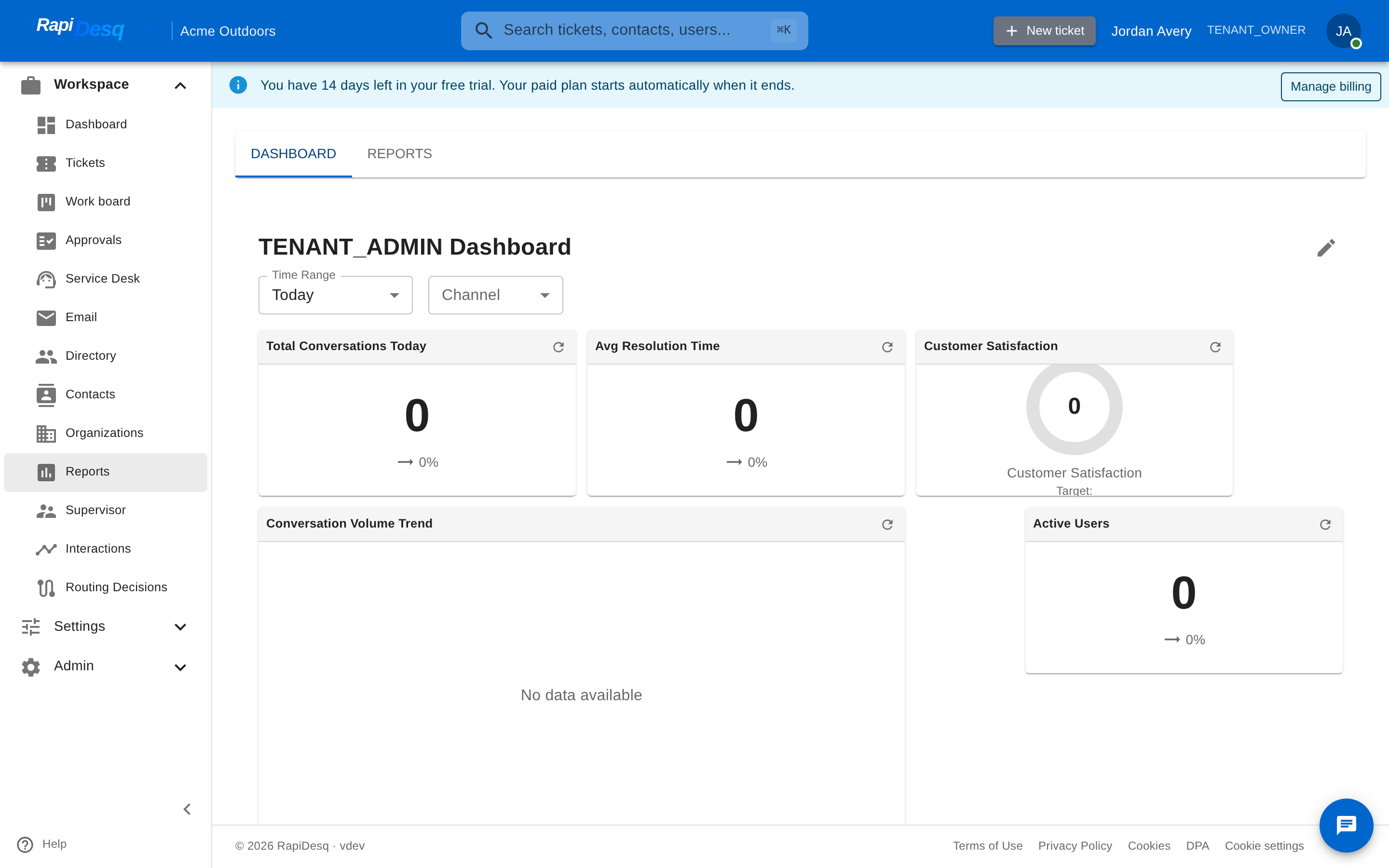 The Dashboard tab: live metric widgets with time-range and channel filters.
The widget catalog covers real-time operations, performance, and trends. Examples include:
- Volume — Conversation Volume Trend, Peak Hours, Channel Distribution
- Performance — Avg Resolution Time, SLA Compliance, Team Comparison, User Performance
- Real-time — Queue Status, User Status, Users Available, Avg Wait Time
- Satisfaction — Customer Satisfaction and CSAT trend widgets, fed by CSAT surveys
Filters
Filters at the top of the dashboard apply to every widget:
- Time Range — Today, Last 7 Days, Last 30 Days, This Month, or a custom range
- Team — one team or all teams
- User — a specific user or all users
- Channel — Chat, Email, SMS, Social, or all channels
Which filters appear depends on your role and permissions — users see channel filtering for their own metrics, while supervisors and admins can also slice by team and user.
Customizing the Dashboard
Click Customize to enter edit mode. While editing you can:
- Add widgets from the Widget Catalog, organized into Real-Time, Performance, Trends, Alerts, and Operational categories
- Drag widgets to rearrange the layout, and remove widgets you don't need
- Reset to Default to return to the standard layout for your role
Saving stores the layout as your own dashboard (with a name and optional description), so it loads the same way every time — in both the Reports area and the supervisor Dashboard tab. When saving, users with reporting access can also choose Share with team members to make the dashboard available to others.
The Reports Tab
The Reports tab generates downloadable report files on demand. Click Generate Report and choose:
- Report Type — one of the six built-in types below
- Format — PDF, CSV, or Excel
- Start Date and End Date — the reporting period
- Team and User (optional) — scope the report to one team or one user
Generation runs in the background. Each report appears in the Report History list with its status — Pending, Generating, Completed, or Failed — and completed reports can be downloaded directly from the list. Generated files are kept for 24 hours, after which they expire; you can re-generate the same report at any time, and delete reports you no longer need.
Built-in Report Types
| Report | What it covers |
|---|---|
| User Performance | Conversations handled, average response time, average resolution time, and satisfaction score — with trends over the period. Useful for one-on-ones and coaching. |
| Team Summary | Team-level totals: conversation volume, average first response time, and user utilization, plus volume and response-time trends. |
| Queue Analytics | How the queue behaved over the period: conversations in queue, average wait time, peak queue depth, and queue depth and wait times over time. Useful for staffing decisions. |
| SLA Compliance | SLA targets met versus breached, the overall compliance rate, and how both moved over time. Essential when you have contractual response commitments. |
| Conversation Volume | Conversations started, resolved, and abandoned over the period — the report that answers "is our support load growing?" |
| CSAT Summary | Average CSAT score, response and invitation counts, response rate, the distribution of scores, score trends, and average score per customer tier. See CSAT Surveys for how this data is collected. |
Best Practices
- Use the supervisor dashboard for operations, Reports for metrics. Live triage belongs on the supervisor view; performance review and stakeholder reporting belong here.
- Save a layout per routine. A focused dashboard with the handful of widgets you check daily beats a crowded default. Share it with the team so everyone reviews the same numbers.
- Track trends, not snapshots. "SLA compliance is 94% this week" is less informative than "compliance has dropped from 98% to 94% over three weeks." Use the trend widgets and time-series report sections for exactly this.
- Download reports promptly. Generated files expire after 24 hours. The configuration is preserved in your history, so re-generating an expired report takes one click of detail entry.
- Scope reports before generating. A Team Summary scoped to one team for one month is more actionable than an everything-everywhere export you filter later in a spreadsheet.
Related Topics
- Supervisor Dashboard — the real-time operational view that complements metric reporting, including AI bot analytics.
- CSAT Surveys — how customer satisfaction data is collected and feeds the CSAT widgets and CSAT Summary report.
- Team Management — the teams that reports and dashboard filters are scoped by.